
Microsoft Entra Agent ID Blueprints and Microsoft Foundry: A Security Guide

Table of Contents
AI agents are showing up in your tenants. Not as a concept, not as a future roadmap item - right now. And with them come two things every security-minded admin needs to understand: Microsoft Entra Agent ID Blueprints and Microsoft Foundry.
I didn't plan to write about AI infrastructure. But after digging into how Microsoft Entra Agent ID governs agent identities and how Microsoft Foundry fits into the security picture, I realized: this is identity and access management all over again - just with a new type of principal.
These are notes for myself, use them as you please
Why AI Agent Identity Matters Now
Think about what's happening in your customers' tenants today.
A sales manager builds an agent in Copilot Studio that reads from SharePoint and sends follow-up emails. An HR lead creates one that processes leave requests through Power Automate. A developer spins up something in Microsoft Foundry that queries Defender data.
These are productive people using the tools Microsoft is putting in front of them. But here's the question nobody's asking yet:
Who is that agent? What can it access? And what happens when the person who built it leaves the company?
If you've spent time managing service principals and app registrations, this should feel familiar. We've been here before - just with a different name.
IDC predicts 1.3 billion agents in circulation by 2028. 80% of the Fortune 500 are already using Microsoft agents. The OWASP Top 10 for Agentic Applications dropped in December 2025, covering risks like goal hijacking, tool misuse, identity abuse, and rogue agents.
This is not a future problem.
What Is Microsoft Entra Agent ID?
Microsoft Entra Agent ID is the identity platform purpose-built for AI agents. It extends the same security and governance capabilities you already use for human identities - Conditional Access, Identity Protection, audit logs, identity governance - to the agents running in your tenant.
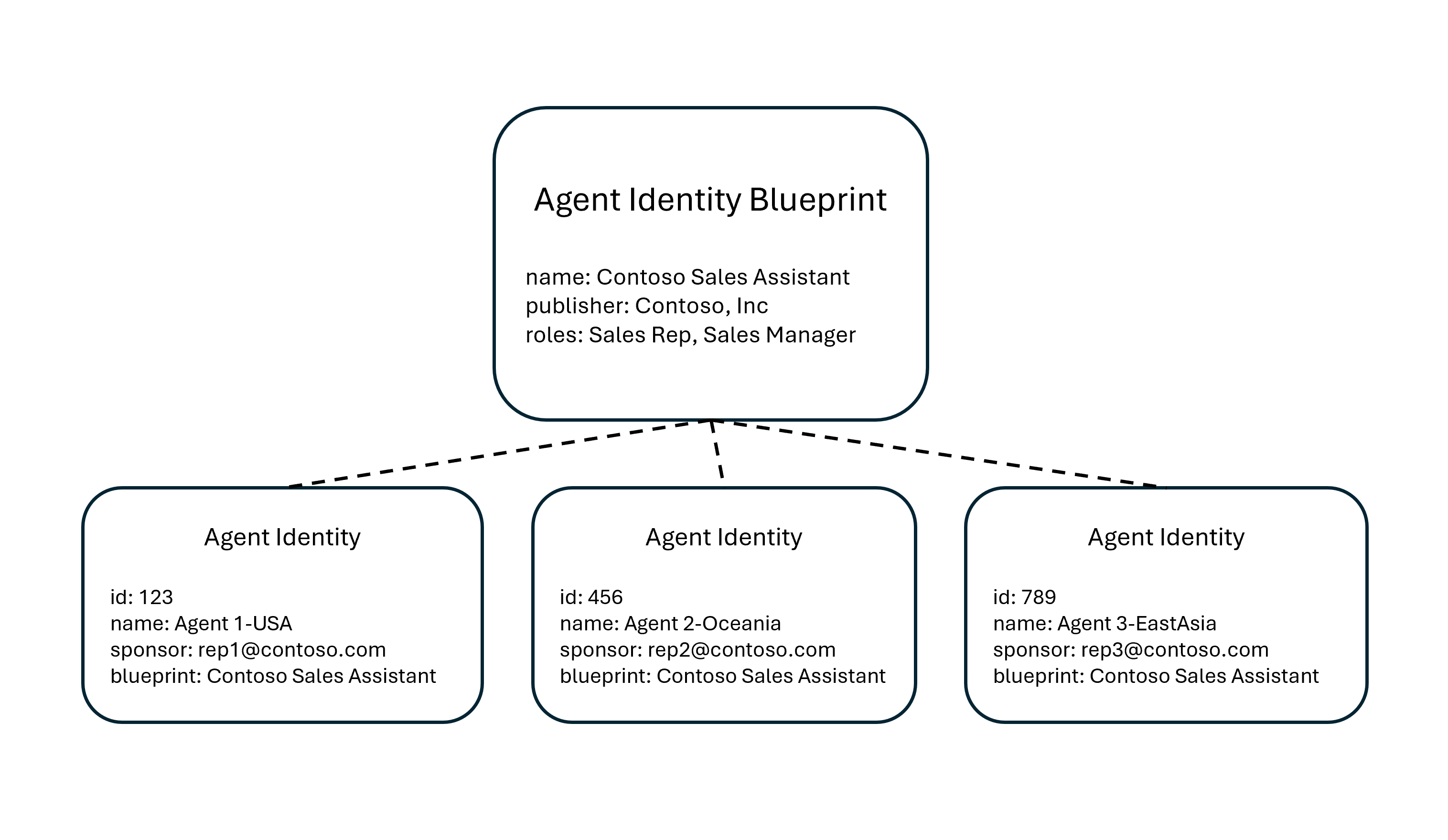
At its core, Microsoft Entra Agent ID introduces a new identity model built around three concepts: the Blueprint, the Blueprint Identity, and the Agent Identity.
What Is an Agent Identity Blueprint?
An Agent Identity Blueprint is a template object in Microsoft Entra ID that serves as the foundation for creating agent identities. Think of it as the equivalent of an App Registration - but designed specifically for agents.
A Blueprint serves four purposes:
| Purpose | What it means |
|---|---|
| Template | All agent identities created from it share a consistent configuration |
| Identity | The Blueprint itself is an identity type - it can provision and deprovision agent identities |
| Credential container | Agent identities don't have their own credentials. The Blueprint holds them and acquires tokens on their behalf |
| Management container | Conditional Access policies, OAuth permissions, and governance settings are applied at the Blueprint level and cascade to all agent identities |
Technically, a Blueprint has two parts: a Blueprint Application (the configuration) and a Blueprint Principal (the service principal that makes the Blueprint visible in the tenant). This is the same relationship as App Registration and Enterprise Application.
If you know Azure Policy or Intune baselines, you already understand Blueprints
The concept behind Agent Identity Blueprints follows the same governance pattern you already use across the Microsoft stack.
If you've worked with Intune security baselines, this clicks immediately. You create a baseline profile once - defining settings like BitLocker enforcement, firewall rules, credential guard, and password policies. Then you assign it to a device group. Every device in that group inherits the same configuration. You don't touch each device individually. The baseline is the source of truth, and every device that enrolls gets the same posture.
Agent Identity Blueprints work the same way. The Blueprint defines the configuration - credentials, OAuth permissions, Conditional Access scope. Every agent identity created from that Blueprint inherits it. New agent spins up? It gets the same governance as the rest. No manual setup per agent.
| Intune device governance | Agent identity governance |
|---|---|
| Security baseline profile | Agent Identity Blueprint - the template that defines the security posture |
| Assign baseline to a device group | Apply Conditional Access to a Blueprint - cascades to all agent identities |
| Device enrolls and inherits settings | Agent identity is created and inherits governance automatically |
| Compliance dashboard shows non-compliant devices | Agent Registry shows unmanaged or classic agents without proper identity |
| Non-compliant device gets blocked by Conditional Access | Risky agent gets blocked by Identity Protection |
The parallel extends further. Just like you have devices that were enrolled before you deployed a baseline - and now sit in a non-compliant state - you likely have classic agents in your tenant that were created before Entra Agent ID existed. They don't have a Blueprint backing them, which means they can't be governed with the new controls. Same problem, same fix: audit, migrate, enforce.
If you've worked with Azure Policy, the pattern is equally familiar. You assign a policy to a Management Group and it cascades to every subscription underneath. Agent Identity Blueprints follow the same inheritance model - define governance once at the top, enforce it everywhere below.
| Azure governance | Agent identity governance |
|---|---|
| Azure Policy definition | Agent Identity Blueprint - the template that defines what's allowed |
| Policy assignment to a Management Group | Conditional Access policy applied to a Blueprint - cascades to all agent identities created from it |
| Subscription inherits policy | Agent Identity inherits governance - each agent created from the Blueprint gets the same controls |
| Policy compliance dashboard | Agent Registry in Entra admin center - visibility into which agents comply |
| Deny effect blocks non-compliant resources | Conditional Access blocks risky agents - Identity Protection flags anomalous behavior |
The difference is scope. Intune baselines govern devices. Azure Policy governs resources. Agent Identity Blueprints govern agent identities. But the principle is identical: centralized template, inherited enforcement, auditable compliance.
Why Blueprints matter at scale
One Conditional Access policy applied to a Blueprint automatically takes effect for every agent identity created from it. You can enforce access controls - blocking authentication from outside trusted networks, requiring compliant devices, blocking risky agents - across an entire fleet of agents in one place.
No per-agent policy configuration. One Blueprint, fleet-wide enforcement.
What Is an Agent Identity?
An Agent Identity is the actual identity assigned to an individual AI agent. It's built on the service principal model but purpose-built for agents.
Each Agent Identity has:
- A unique object ID generated by Microsoft Entra
- A display name visible in the Entra admin center
- A sponsor - the human user or group accountable for the agent (required)
- An owner - the person responsible for day-to-day management (recommended)
Microsoft Entra Agent ID supports two patterns for how agents operate:
| Pattern | How it works |
|---|---|
| Interactive agents | Sign in a user, act on their behalf using delegated permissions (user tokens) |
| Autonomous agents | Run in the background using app-only tokens, no user involvement (agent tokens) |
There's also an optional Agent User - a special user account with a 1:1 relationship to an Agent Identity, for systems that strictly require a Microsoft Entra user object (like accessing a mailbox or joining a Teams meeting).
Classic Agents vs. Modern Agents in Microsoft Entra
Not all agents in your tenant are equal. Microsoft now distinguishes between two types:
Classic agents are AI agents created as standard service principals or app registrations - for example, agents built in Copilot Studio before Microsoft Entra Agent ID was enabled. They appear in the Agent Registry with "Has Agent ID: No". Classic agents cannot be protected by Identity Protection for Agents or Conditional Access for Agents.
Modern agents are created through the Microsoft Entra Agent ID platform, each backed by a Blueprint. They have a proper Agent ID, full audit trail, and support the complete set of governance capabilities.
Microsoft has indicated a migration tool is planned to convert classic agents to modern agents. In the meantime, it's worth auditing your tenant now:
Quick check: In the Microsoft Entra admin center, navigate to Enterprise applications and set the Application type filter to Agent ID (Preview). This gives you immediate visibility into the agent identities in your directory.
What Is Microsoft Foundry?
If Microsoft Entra Agent ID is the identity and governance layer, Microsoft Foundry is the platform where agents are built, deployed, and operated.
You might know it by its previous names. Azure AI Studio became Azure AI Foundry at Ignite 2024. Then Azure AI Foundry became Microsoft Foundry at Ignite 2025. The "Azure" was dropped to signal that agents are now first-class citizens across the Microsoft ecosystem, not just another Azure service.
Microsoft Foundry components
| Component | What it does |
|---|---|
| Foundry Models | Access to 11,000+ models - Microsoft MAI, OpenAI, Anthropic Claude, Meta Llama, Mistral, and more |
| Foundry Agent Service | Build agents that reason, plan, and act across tools, data, and workflows |
| Foundry Control Plane | Fleet-wide monitoring, governance, evaluations, and security with Defender and Entra ID integration |
| Foundry IQ | Ground agent responses in enterprise data using Azure AI Search with citation-backed answers |
| Foundry Local | Run AI models on-device or at the edge, including sovereign and disconnected environments |
How Microsoft Foundry connects to Entra Agent ID
When you create an agent in Microsoft Foundry, it automatically provisions an Agent Identity Blueprint and Agent Identity in your Entra tenant. Publishing an agent creates a dedicated Blueprint and Agent Identity. Authentication flows through the Blueprint's credentials using OAuth 2.0 flows optimized for AI workloads.
This means every Foundry agent is visible and governable through the same Entra admin center you already use.
Microsoft Foundry Security and Governance
The security integration in Microsoft Foundry is where this gets practical for admins:
Microsoft Defender integration - Security posture management for Foundry agents detects misconfigurations and vulnerabilities. Detection, investigation, and response capabilities cover attacks targeting agents, including prompt manipulation, model tampering, and agent-based attack chains.
Microsoft Entra ID integration - RBAC, Conditional Access for agents, and the full Agent Identity Blueprint model. Agents authenticate using the same identity infrastructure as your users and workloads.
Microsoft Purview integration - Data governance and compliance controls extend to agent interactions, ensuring sensitive data accessed by agents is protected and auditable.
Content Safety - Runtime detection and mitigation of harmful content, including prompt injection attacks, hallucinations, and bias.
Microsoft was recently named a Leader in the IDC MarketScape for Unified AI Governance Platforms, citing this integrated approach across Foundry, Agent 365, Purview, Entra, and Defender.
Agent 365: The Unified Control Plane
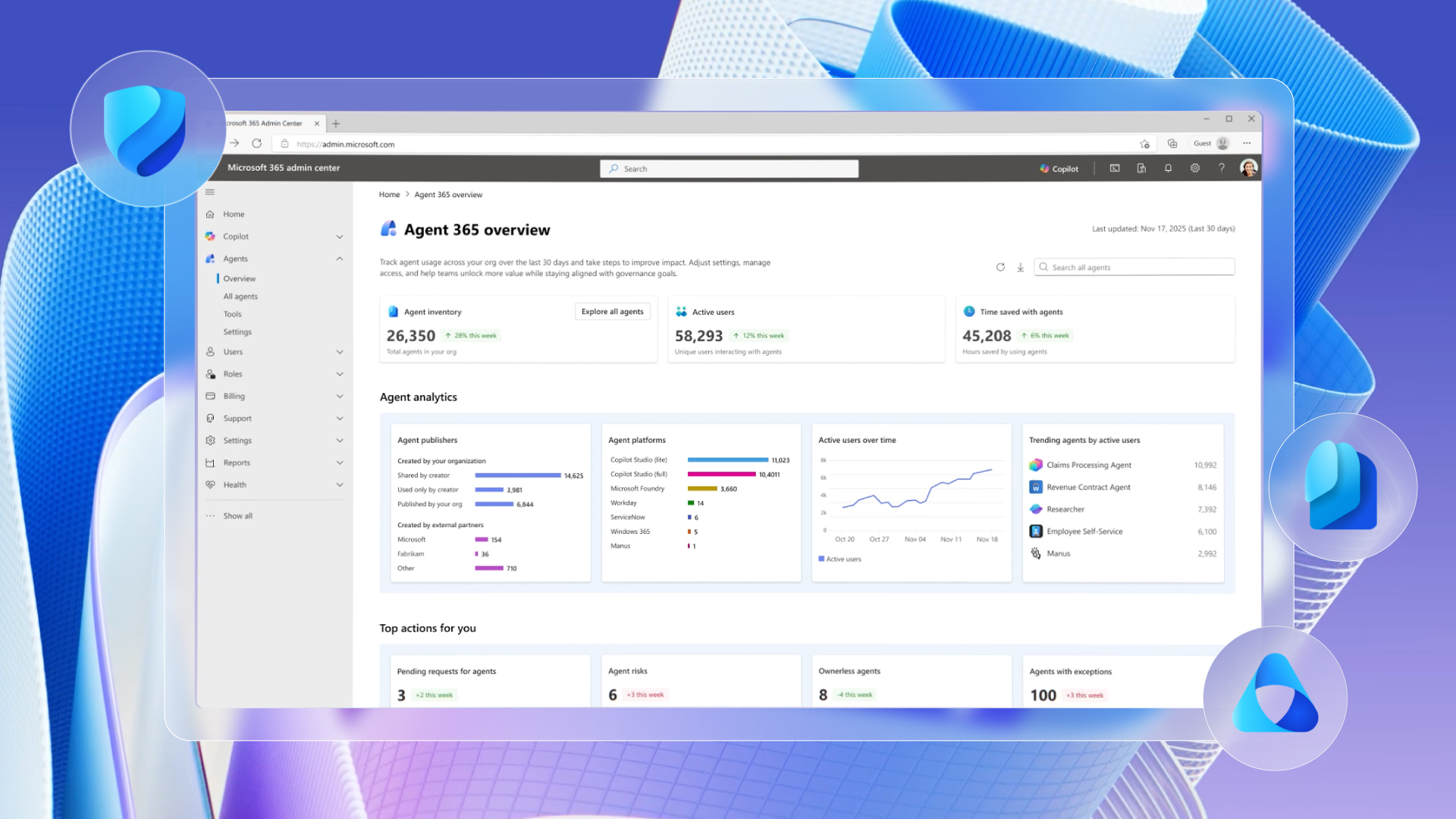
Coming generally available May 1, 2026, Microsoft Agent 365 is the control plane that brings Entra Agent ID, Foundry governance, and Defender protections together for IT and security teams. Priced at $15 per user per month, it provides:
- Visibility - which agents exist across your organization, across Copilot Studio, Foundry, and third-party platforms
- Identity and lifecycle management - through Microsoft Entra Agent ID
- Security posture management - for Foundry and Copilot Studio agents
- Detection, investigation, and response - for attacks targeting agents
- Runtime threat protection - for agents using the Agent 365 tools gateway
The per-user license covers all agents acting on behalf of that licensed user - no per-agent fees.
The new Microsoft 365 E7 ($99/user/month) bundles Agent 365 with Copilot, Entra Suite, and the full Defender, Intune, and Purview security stack.
What This Means for You
Here's how I'd frame this:
Identity is expanding. We've gone from managing users → to managing users and devices → to managing users, devices, and agents. The same governance principles apply: least privilege, lifecycle management, Conditional Access, audit logging. Blueprints are the mechanism to do this at scale.
Microsoft Foundry is the AI platform. If your organization or your customers are building agents - whether in Copilot Studio, with the Microsoft Agent Framework, or through direct API integration - Foundry is where they get deployed, monitored, and governed.
Agent sprawl is the new shadow IT. Business users are already building agents. Without governance in place, you'll end up with orphaned agents, excessive permissions, and no audit trail. This is the service principal cleanup problem, but accelerated.
Try This
Please select one tenant you manage and respond to the following questions:
- How many agents exist today? (Check Enterprise applications → Application type → Agent ID)
- Which are classic vs. modern?
- Who sponsors them? Who's accountable if something goes wrong?
- Are any Conditional Access policies applied to agent identities?
- Do you have visibility into what data these agents can access?
If you can't answer those questions - you've found your next project.
Resources
Microsoft Entra Agent ID
 Dickson-Mwendia
- Overview of agent identities in Microsoft Entra - Microsoft Learn
- Governing Agent Identities - Microsoft Learn
- Microsoft Entra Agent ID: A Practical Guide to Blueprints and Agent Identities - thalpius.com
- Announcing Microsoft Entra Agent ID - Microsoft Tech Community
Microsoft Foundry
 sdgilley
Agent 365 and Governance
 Vasu Jakkal